
• jít k obsahu

Uživatelské nástroje

  • Přihlásit se

Nástroje pro tento web

  • Poslední úpravy
  • Správa médií
  • Mapa stránek
Historie: • 7.4 SM2-DI • 3.4 Připojení k elektroměru • Connection Diagram • 7.1 Instalace rozšiřujících modulů • 1.2.1 1. krok - Obecné nastavení • 7.1.4 Zobrazení a tisk faktury • Basic Characteristics • 3.1 Celková výroba a osvit • 1.2.4 4. krok - Nastavení čítačů • Connection Diagram

Postranní lišta

Solar Monitor User Guide

  • Contents
  • FAQs
  1. Quick Setup
    1. Installation
      1. Sensors
        1. Examples of sensor connection diagrams
          1. Example 1
          2. Example 2
          3. Example 3
      2. Inverters
      3. Electrometer
      4. LAN
      5. Digital Inputs
      6. Digital Outputs
      7. Power Supply
    2. Setup Wizard
      1. General Settings
      2. Interface Settings
      3. Sensor detection
      4. Counter Settings
      5. Emails & SMS
      6. Portal Setup
      7. Date & Time
      8. Summary
  2. Overview
    1. Basic features
    2. Parameters
    3. Safety Warning
    4. Interface Description
  3. How to Install?
    1. Mechanical Fastening
    2. Sensors
    3. Inverters
    4. Electrometer
    5. LAN
    6. Digital inputs and outputs
    7. Plugging a power source
  4. Quick Start
    1. Unit discovery in a LAN
    2. Web interface
  5. Factory Reset
    1. How to factory reset?
  6. Web
    1. Overview
      1. Peaks
      2. LCD Panel
    2. Graphs
    3. Alerts
      1. System Log
      2. Power Control Log
      3. Sending History
    4. Settings
      1. Network & Time
      2. Portal
      3. Email & SMS
      4. GSM / GPRS
      5. SNMP
      6. Modbus
      7. Sensors & Alerts
      8. Find Devices
        1. RS 485
        2. RS 232
        3. Ethernet
      9. Inputs & Counters
      10. Outputs
      11. Power Control
      12. HBUS Modules
      13. Backup, CSV, FW
  7. Extension Modules
    1. Installation
    2. SM2-AD
      1. Module Parameters
      2. SM2-AD Installation
      3. Setup
      4. AI Setup
      5. AO Setup
      6. DO Setup
      7. More SM2-AD?
    3. SM2-BE
    4. SM2-DI
    5. SM2-GSM
    6. SM2-PC
en:sim:manual:jak_na_instalaci:danfoss

Toto je starší verze dokumentu!


Connection Diagram
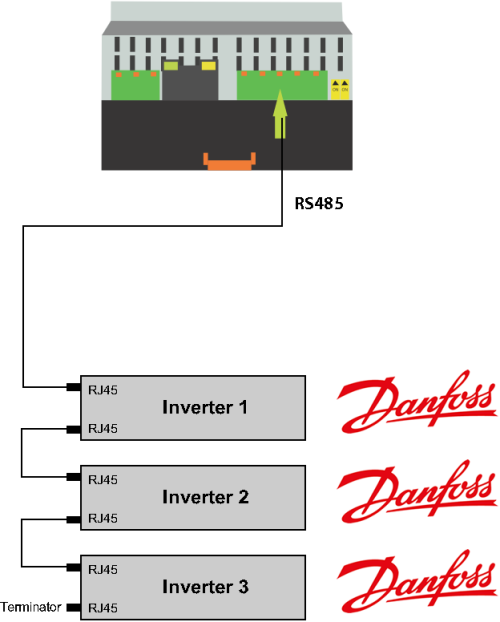


In case of the involvement of multiple inverters, connect the inverters with straight cable.

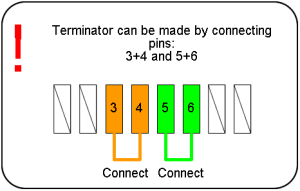
A terminator is connected at the last output of the inverter.
<< Back

en/sim/manual/jak_na_instalaci/danfoss.1411738897.txt.gz · Poslední úprava: 2014/09/26 15:41 autor: ondra

Nástroje pro stránku

  • Starší verze
  • Zpětné odkazy
  • Nahoru
Kromě míst, kde je explicitně uvedeno jinak, je obsah této wiki licencován pod následující licencí: CC Attribution-Noncommercial-Share Alike 4.0 International
CC Attribution-Noncommercial-Share Alike 4.0 International Donate Powered by PHP Valid HTML5 Valid CSS Driven by DokuWiki